Otimizar as operações com IA: comece pelo processo, não pelo modelo
A forma mais rápida de desperdiçar dinheiro em IA é começar pela tecnologia. Uma equipa compra uma ferramenta, ou entusiasma-se com um modelo, e depois anda à procura de um problema onde a encaixar. O resultado é um piloto que impressiona uma vez e não muda nada.
As equipas que conseguem ganhos operacionais reais fazem o contrário. Partem de um processo que já compreendem, encontram o passo que é lento ou caro, e automatizam esse único passo, mantendo uma pessoa no circuito onde isso importa, e medindo o antes e o depois. Pequeno, comprovado, e só depois alargado. É isto que queremos dizer com IA enxuta: a menor mudança que move um número real, entregue, antes da seguinte.
Este é o guia: a ordem de operações, o punhado de passos em que a IA é genuinamente boa, um exemplo prático com números, como decidir quanta autonomia dar, o que medir, e os modos de falha que matam estes projetos em silêncio.
A ordem de operações
1. Parta de um processo que já mede
Se não tem uma referência, não consegue saber se algo melhorou, e "parece mais rápido" não sobrevive a uma revisão de orçamento. Comece por um processo onde já acompanha algo: faturas tratadas por dia, tempo para resolver um pedido, horas gastas num relatório mensal, idade da fila.
Se ainda não mede nada, meça primeiro. Uma semana a observar para onde o tempo vai de facto, a acompanhar quem faz o trabalho, a cronometrar os passos, vale mais do que um mês de apresentações de estratégia. Muitas vezes descobre-se que o verdadeiro estrangulamento não está onde se julgava.
2. Mapeie o processo e encontre o único passo lento
Desenhe o processo como ele corre na realidade, passo a passo, incluindo as passagens de mão e as esperas. Em quase todos os processos há um passo onde pessoas qualificadas gastam tempo em trabalho que não exige a sua qualificação: copiar dados entre sistemas, ler um documento para tirar três campos, redigir a primeira versão de algo, procurar onde está escrita uma política, cruzar duas listas a olho.
Esse passo é o alvo. É repetitivo, é um estrangulamento, e é exatamente o que a IA atual faz bem. Não está a tentar automatizar o processo inteiro, está a tentar remover a parte que desperdiça o tempo das suas melhores pessoas e atrasa tudo o que vem a seguir.
3. Decida quanta autonomia o passo pode ter
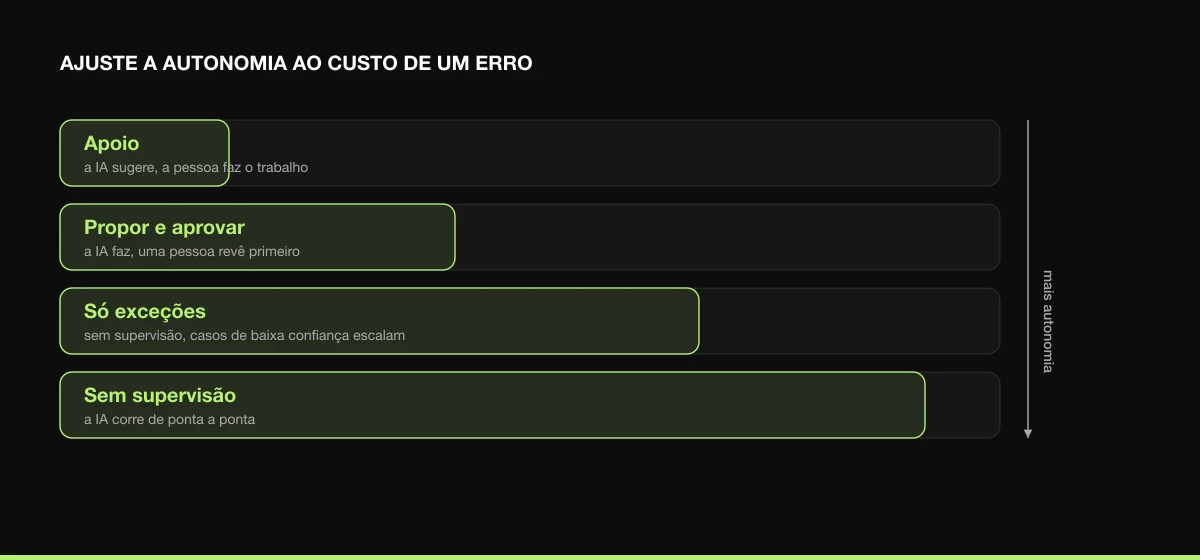
É aqui que o custo do erro define o desenho. Faça corresponder o nível de autonomia ao que um erro custaria:
| Nível |
O que significa |
Usar quando |
| Apoio |
A IA sugere; a pessoa faz o trabalho com a sugestão à vista |
O juízo é o trabalho e o risco é elevado |
| Propor e aprovar |
A IA faz o trabalho; uma pessoa revê antes de ser usado |
O padrão para a maioria dos primeiros projetos |
| Só exceções |
A IA corre sem supervisão; só os casos de baixa confiança vão a um humano |
A taxa de erro está comprovadamente baixa e o modelo sinaliza a própria incerteza |
| Sem supervisão |
A IA corre de ponta a ponta |
Os erros são visíveis, baratos e raros |
Quase todos os bons projetos começam em propor-e-aprovar e ganham mais autonomia à medida que a taxa de erro se prova. Não comece sem supervisão em nada que mova dinheiro ou chegue a um cliente.
4. Construa pequeno, entregue, meça
Resista a redesenhar a operação inteira de uma vez. Construa o único passo, coloque-o a tratar uma fatia de volume real, e compare as mesmas métricas que estabeleceu como referência. Uma mudança que leva um passo de 14 minutos para 3, com a mesma taxa de erro, é um resultado que qualquer pessoa do financeiro entende. "Adotámos IA" não é.
Cada pequena vitória medida financia e reduz o risco da seguinte, e cria a confiança de que precisa antes de automatizar algo maior. Uma série de melhorias entregues bate um programa ambicioso que continua "em curso" um ano depois.
Os cinco passos em que a IA é mesmo boa
Nas equipas de operações, são sempre os mesmos poucos passos que surgem como os primeiros alvos certos. Partilham uma forma: volume alto, juízo de baixo a médio, input desordenado que as regras não captam por completo, e uma forma barata de apanhar erros.
| Passo |
O que faz |
Tempo poupado típico |
Risco |
| Extração de documentos |
Tirar campos estruturados de faturas, contratos, formulários |
Alto, minutos por documento, em volume |
Baixo, com revisão |
| Triagem e encaminhamento |
Ler um pedido recebido e enviá-lo para o sítio certo |
Alto, elimina uma fila de triagem manual |
Baixo-médio |
| Primeiras versões |
Propostas, respostas, relatórios, resumos que uma pessoa depois finaliza |
Médio-alto, a página em branco é a parte lenta |
Baixo (o humano finaliza) |
| Pesquisa interna |
Responder a "onde está escrito que…" a partir dos vossos documentos |
Médio, acaba com a procura repetida |
Baixo-médio |
| Reconciliação |
Cruzar registos entre dois sistemas e sinalizar o que não bate |
Alto, substitui a verificação linha a linha |
Baixo, com revisão dos sinalizados |
Nenhum destes é glamoroso. Todos devolvem horas por semana, começam com risco baixo e têm uma referência óbvia contra a qual medir. Se procura um primeiro projeto, procure aqui antes de procurar em algo mais vistoso.
Um exemplo prático: entrada de faturas
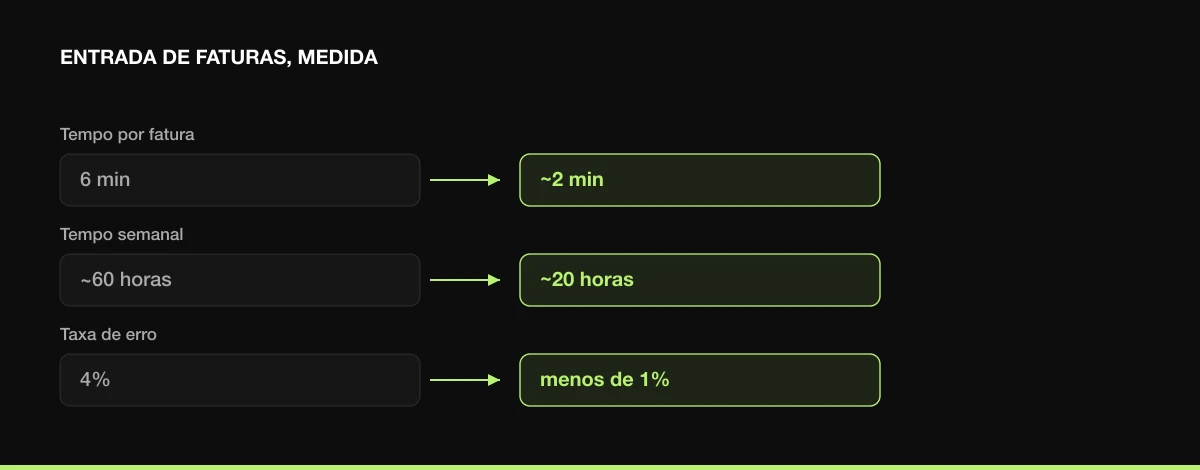
Imagine uma equipa financeira a processar cerca de 600 faturas de fornecedores por semana. Hoje cada uma é tratada à mão: abrir o PDF, ler o fornecedor, o valor, a data de vencimento e o número de PO, lançá-los no sistema de contabilidade, sinalizar o que for invulgar. Cerca de 6 minutos cada, com uma taxa de 4% de erros de digitação que gera retrabalho a jusante.
O mapa mostra o passo lento com clareza: é a leitura-e-lançamento, não a aprovação. Por isso é aí que a IA entra. A extração lê cada fatura e pré-preenche os quatro campos. O desenho é propor-e-aprovar: a pessoa passa a verificar e confirmar um lançamento pré-preenchido em vez de o escrever de raiz, e o sistema encaminha apenas as extrações de baixa confiança para atenção mais próxima.
Os números, ao fim de algumas semanas em volume real:
- Tempo de tratamento por fatura: 6 minutos → cerca de 2 minutos (a pessoa verifica em vez de transcrever).
- Tempo semanal: ~60 horas → ~20 horas. Quarenta horas por semana devolvidas.
- Taxa de erros de digitação: 4% → menos de 1%, porque as pessoas apanham melhor os erros do que evitam cometê-los.
O que fez isto funcionar não foi o modelo, a extração é terreno conhecido. Foi que o caso de uso tinha volume, os dados já existiam num canal consistente, uma pessoa ficou no circuito num passo de risco limitado, e havia uma referência limpa para provar o resultado. A mesma forma transfere-se para a entrada de sinistros, a papelada de onboarding e o processamento de encomendas.
O que medir
Instrumente antes de mudar o que quer que seja, e meça o mesmo depois. Quatro métricas cobrem a maioria dos casos operacionais:
- Tempo de ciclo, quanto tempo demora o passo, por unidade e de ponta a ponta.
- Débito, unidades tratadas por pessoa por dia.
- Taxa de erro / retrabalho, com que frequência o resultado está errado e tem de ser refeito.
- Custo por unidade, o custo carregado de tratar um item.
Vigie a taxa de erro tão de perto como o tempo poupado. Uma mudança que reduz para metade o tempo de ciclo mas duplica os erros não é uma vitória, apenas empurrou o custo para jusante, onde é mais difícil de ver. O objetivo é mais rápido com a mesma qualidade ou melhor.
Modos de falha a evitar
- Automatizar um processo avariado. A IA é um multiplicador. Multiplique um bom processo e obtém mais bom; multiplique um emaranhado, sem dono claro, com uma passagem de mão má, e industrializa a confusão, mais depressa. Resolva primeiro os problemas óbvios do processo. Às vezes é só isso a vitória e nem precisa de IA.
- Começar pela ferramenta. Uma capacidade à procura de um problema produz demonstrações, não resultados. Comece pelo trabalho.
- Saltar a referência. Se não mediu antes, não consegue provar depois, e o projeto é cortado. Esta é a razão mais comum para bons pilotos morrerem.
- Autonomia a mais, cedo de mais. Correr sem supervisão logo no primeiro dia, em algo com risco real, transforma uma pequena taxa de erro numa taxa de erro pública. Ganhe a autonomia.
- Âmbito a ferver o oceano. "Transformar as operações" não é um projeto. O único passo lento que consegue entregar este trimestre é que é.
- Sem dono. Uma mudança de processo sem um dono responsável volta à forma antiga dentro de um mês.
A forma de um bom primeiro projeto
Juntando tudo, o perfil é consistente: um passo que acontece centenas de vezes por semana, com dados que já tem, onde uma pessoa consegue apanhar erros a baixo custo, com um dono que sente a dor, e um número que consegue estabelecer como referência hoje. Entregue isso, prove que moveu o número, e passe ao passo seguinte. Otimizar as operações com IA não é uma decisão de tecnologia, é uma decisão de operações que, por acaso, usa IA num passo.
É assim que o conduzimos com clientes: mapear o processo, encontrar o passo lento, desenhar o nível certo de supervisão humana, entregar uma fatia pequena e comprovada, e medir. Comece pelo trabalho, mantenha uma pessoa onde importa, e deixe os números defenderem o que automatizar a seguir.


 Miguel Vicente Jr
